文字版
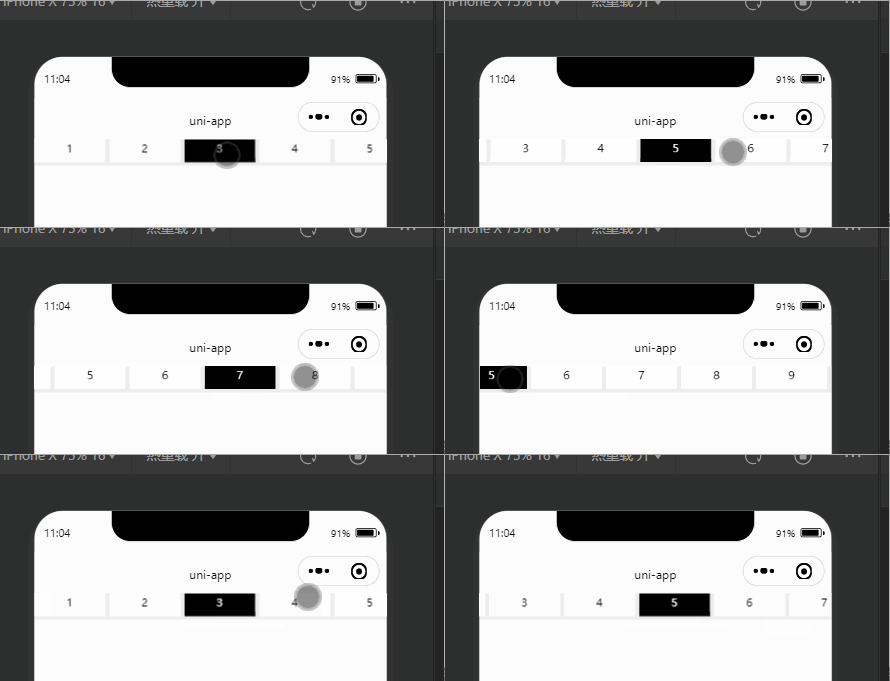
源码
<template>
  <view class="content">
    <view class="scrollBox">
      <scroll-view class="scroll" scroll-x='true' scroll-with-animation :scroll-left='scrollLeft'>
        <view class="tabBox" v-for="(item,index) in tabsList" :key="index"
          :class="[{ active: currentIndex === index }, 'scroll-item']" @click="changeTab(index)">
          <view class="nanum" :class="currentIndex === index?'active':''">
            {{index+1}}
          </view>
        </view>
      </scroll-view>
    </view>
  </view>
</template>

<script>
  export default {
    data() {
      return {
        scrollWidth: 0,
        tabsList: [{
            id: 1,
            name: 'tab1',
          },
          {
            id: 2,
            name: 'tab2',
          },
          {
            id: 3,
            name: 'tab3',
          },
          {
            id: 4,
            name: 'tab4',
          },
          {
            id: 5,
            name: 'tab5',
          },
          {
            id: 6,
            name: 'tab6',
          },
          {
            id: 7,
            name: 'tab7',
          },
          {
            id: 8,
            name: 'tab8',
          },
          {
            id: 9,
            name: 'tab9',
          }
        ],
        currentIndex: 0,
        scrollLeft: 0,
      }
    },
    onLoad() {
      // 获取元素宽度
      const query = uni.createSelectorQuery().select('.scroll');
      query.boundingClientRect(res => {
        this.scrollWidth = res.width;
      }).exec()
    },

    methods: {
      // 切换Tab
      changeTab(index) {
        console.log(index, "文字tab");
        this.currentIndex = index;
        this.moveTo(index)
      },
      // 当前点击的元素移动到屏幕中间
      moveTo(index) {
        const query = uni.createSelectorQuery().in(this)
        query.selectAll('.scroll-item').boundingClientRect(rect => {
          const windowWidth = this.scrollWidth; // 获取到的屏幕宽度
          let width = 0
          // 计算当前点击的标签项距离左侧的距离
          for (let i = 0; i < index; i++) {
            width += rect[i].width
          }
          // 当大于屏幕一半的宽度则滚动,否则就设置左侧位置为0
          if (width > windowWidth / 2) {
            this.scrollLeft = width + rect[index].width / 2 - windowWidth / 2
          } else {
            this.scrollLeft = 0
          }
        }).exec()
      },

    }
  }
</script>

<style scoped>
  .scrollBox .tabBox {
    width: 150rpx;
    height: 100%;
    margin-right: 10rpx;
    padding: 4rpx;
    box-sizing: border-box;
    background-color: #fff;
    margin-top: 40rpx;
  }

  .scrollBox .tabBox .nanum {
    width: 100%;
    text-align: center;
    font-size: 24rpx;
    position: absolute;
    bottom: 0;
    left: 0;
    height: 60rpx;
    line-height: 60rpx;
    background: #fff;
  }

  .scroll {
    width: 100%;
    white-space: nowrap;
    height: 100%;
    background-color: #eee;
  }

  .scroll view {
    display: inline-block;
    font-size: 30rpx;
    color: #000;
    position: relative;
  }

  .scroll view.active {
    background-color: #000000 !important;
    color: #fff !important;
  }
</style>
图片版
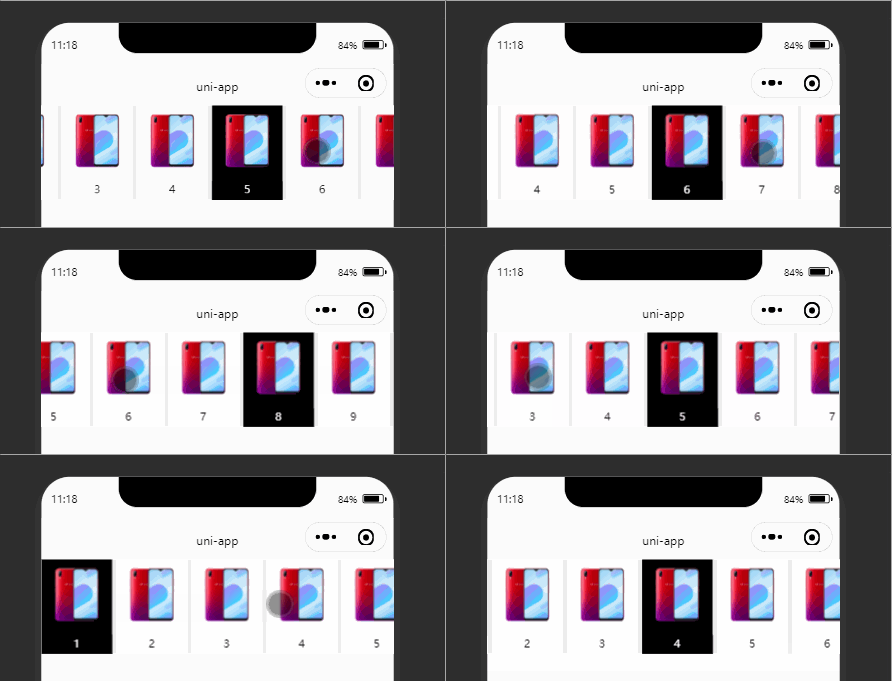
源码
<template>
  <view class="content">
    <view class="scrollBox">
      <scroll-view class="scroll" scroll-x='true' scroll-with-animation :scroll-left='scrollLeft'>
        <view class="imagbx" v-for="(item,index) in tabsList" :key="index"
          :class="[{ active: currentIndex === index }, 'scroll-item']" @click="changeTab(index)">
          <image :src="item.img" mode="widthFix"></image>
          <view class="nanum" :class="currentIndex === index?'active':''">
            {{index+1}}
          </view>
        </view>
      </scroll-view>
    </view>
  </view>
</template>

<script>
  export default {
    data() {
      return {
        scrollWidth: 0,
        tabsList: [{
            id: 1,
            name: 'img1',
            img: 'https://img.pconline.com.cn/images/product/1144409/201812/10/15444358345118610_800.png'
          },
          {
            id: 2,
            name: 'img2',
            img: 'https://img.pconline.com.cn/images/product/1144409/201812/10/15444358345118610_800.png'
          },
          {
            id: 3,
            name: 'img3',
            img: 'https://img.pconline.com.cn/images/product/1144409/201812/10/15444358345118610_800.png'
          },
          {
            id: 4,
            name: 'img4',
            img: 'https://img.pconline.com.cn/images/product/1144409/201812/10/15444358345118610_800.png'
          },
          {
            id: 5,
            name: 'img5',
            img: 'https://img.pconline.com.cn/images/product/1144409/201812/10/15444358345118610_800.png'
          },
          {
            id: 6,
            name: 'img6',
            img: 'https://img.pconline.com.cn/images/product/1144409/201812/10/15444358345118610_800.png'
          },
          {
            id: 7,
            name: 'img7',
            img: 'https://img.pconline.com.cn/images/product/1144409/201812/10/15444358345118610_800.png'
          },
          {
            id: 8,
            name: 'img8',
            img: 'https://img.pconline.com.cn/images/product/1144409/201812/10/15444358345118610_800.png'
          },
          {
            id: 9,
            name: 'img9',
            img: 'https://img.pconline.com.cn/images/product/1144409/201812/10/15444358345118610_800.png'
          }
        ],
        currentIndex: 0,
        scrollLeft: 0,
      }
    },
    onLoad() {
      // 获取元素宽度
      const query = uni.createSelectorQuery().select('.scroll');
      query.boundingClientRect(res => {
        this.scrollWidth = res.width;
      }).exec()
    },

    methods: {
      // 点击切换Tab
      changeTab(index) {
        console.log(index, "图片tab");
        this.currentIndex = index;
        this.moveTo(index)
      },
      // 点击元素移动到中间
      moveTo(index) {
        const query = uni.createSelectorQuery().in(this)
        query.selectAll(`.scroll-item`).boundingClientRect(rect => {
          const windowWidth = this.scrollWidth; // 屏幕宽度
          let width = 0
          // 计算当前点击的标签项距离左侧的距离
          for (let i = 0; i < index; i++) {
            width += rect[i].width
          }
          // 当大于屏幕一半的宽度则滚动,否则就设置左侧位置为0
          if (width > windowWidth / 2) {
            this.scrollLeft = width + rect[index].width / 2 - windowWidth / 2
          } else {
            this.scrollLeft = 0
          }
        }).exec()
      },

    }
  }
</script>

<style scoped>
  .scrollBox .imagbx {
    width: 150rpx;
    height: 100%;
    margin-right: 10rpx;
    padding: 4rpx;
    box-sizing: border-box;
    background-color: #fff;
  }

  .scrollBox .imagbx image {
    height: 160rpx;
    width: 100%;
    margin-bottom: 44rpx;
  }

  .scrollBox .imagbx .nanum {
    width: 100%;
    text-align: center;
    font-size: 24rpx;
    position: absolute;
    bottom: 0;
    left: 0;
    height: 40rpx;
    background: #fff;
  }

  .scroll {
    width: 100%;
    white-space: nowrap;
    height: 100%;
    background-color: #eee;
  }

  .scroll view {
    display: inline-block;
    font-size: 30upx;
    color: #000;
    position: relative;
  }

  .scroll view.active {
    background-color: #000000 !important;
    color: #fff !important;
  }
</style>